Updated: May 4, 2020
Office365
Click the button to access Office365 products including Outlook, SharePoint, OneDrive, Teams, and all Microsoft Office products.
Office365 Log-in (Open in new window) OneDrive Installation (iOS) OneDrive Installation (Android)
Microsoft Authenticator
Two-Step Secure Log-In (aka MFA) is an important security feature that allows our remote workforce access to sensitive digital assets and resources while ensuring the highest level of security.
You do no need to log into VPN to sign up for Two-Step Secure Log-In.
- Go through the two-factor setup on your Microsoft Office 365 account, which can be done from any computer.
- Install Microsoft Authenticator on a phone or tablet (NOT a computer). Please continue the set up following these instructions. For video instructions click here.
- In the future, when you are logging in to your Microsoft Office 365 account (from anywhere, on any device), you will be prompted to enter a code. Use the Microsoft Authenticator app to get the code.
GlobalProtect VPN
The City of Irvine provides VPN software for authorized employees to access City resources remotely. Contact your IT Liaison representative or supervisor to request access.
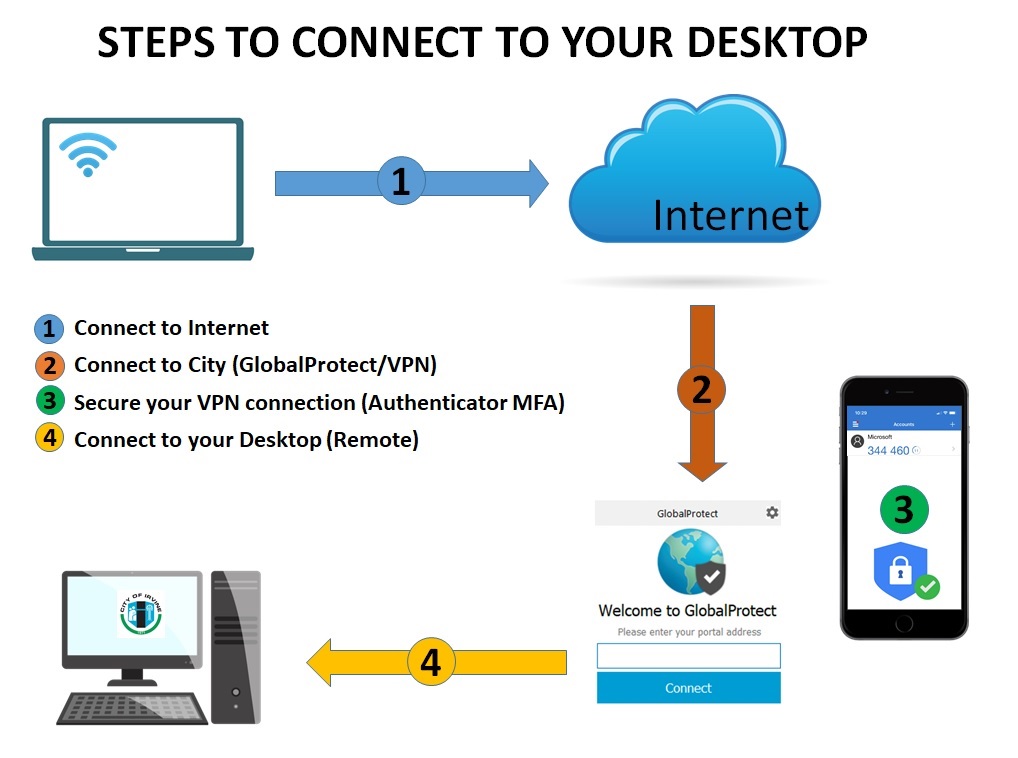
Click on the image to expand
Below are instructions to install GlobalProtect VPN software on your device and how to use Remote Desktop Connection to access your City desktop. Also included are video instructions to help you with Windows security updates.
- Windows instructions for GlobalProtect VPN software and Remote Desktop Connection
- iPad/iPhone instructions for GlobalProtect VPN software, Remote Desktop Connection and iOS Software Updates
- Mac instructions for GlobalProtect VPN software, Remote Desktop Connection and Mac Software Updates
- Video Instructions for GlobalProtect VPN Installation (Windows Only)
- Video Instructions for Windows Security Updates
Also provided is a guide from IT on remote technical support and information from Payroll on how to complete and submit timecards remotely.
- Remote Support FAQ's
- Payroll
- Timekeeping (VTI)
- COVID-19 Employment FAQ’s
Should you need assistance please contact the IT Help Desk at HELP (x4357) or (949) 724-HELP (4357)